A Long Jump Technique Analyzer Built on Real Biomechanics
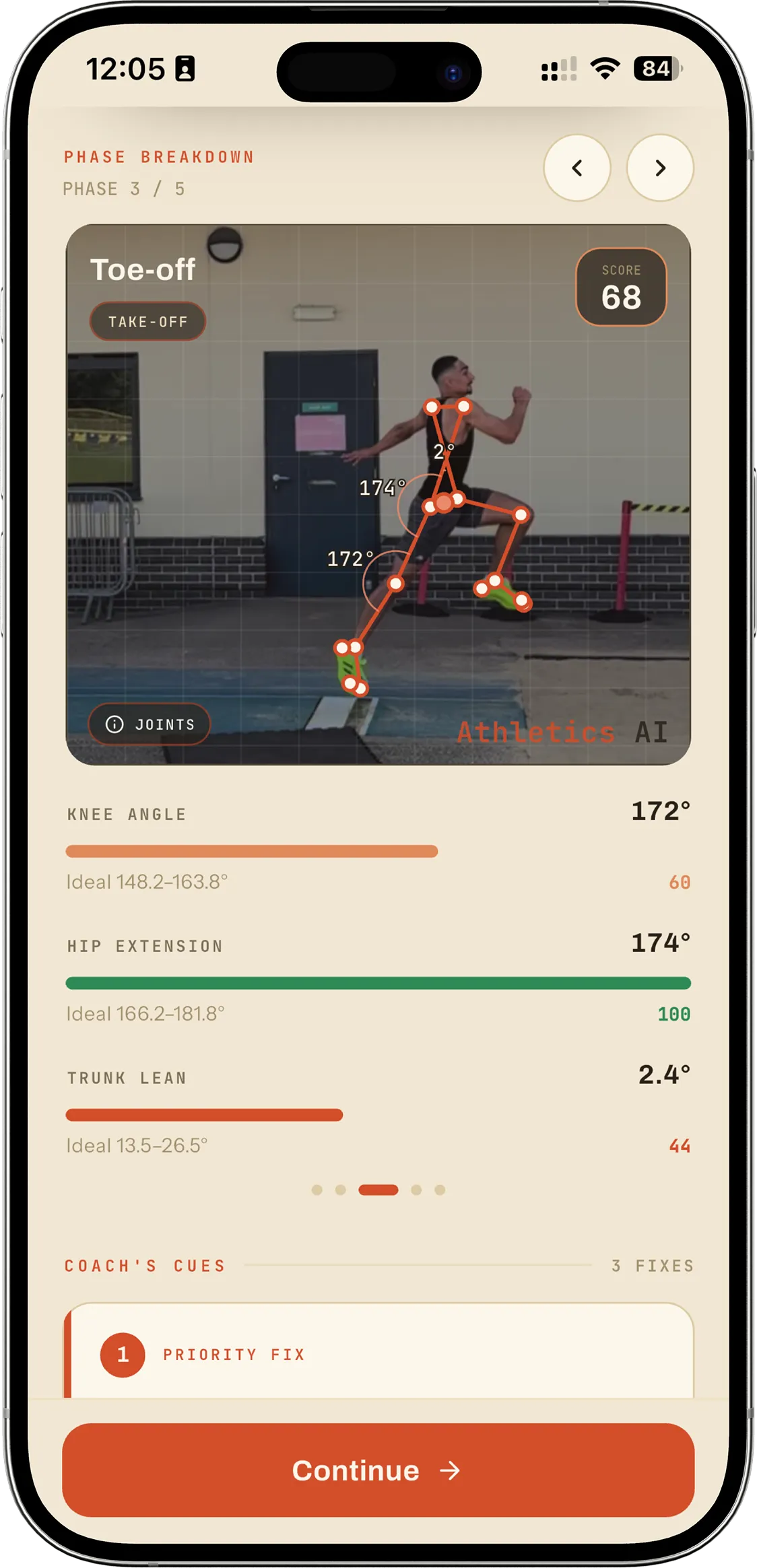
Film one attempt on your phone. Athletics AI places your joints in every frame and gives you the numbers coaches actually measure — takeoff angle, knee drive, hip extension, landing distance.
Markerless. No sensors, no second camera, nothing to set up — an AI long jump analyzer that works off the jump you already filmed.


The Four Numbers That Decide the Jump
An analyzer is only as good as the things it chooses to measure. These four are the ones that change what you do at your next session — not the ones that are easiest to compute.
The angle your centre of mass leaves the board at.
The most diagnostic number in the jump. Too steep and you turn speed into height you cannot use; too shallow and you never get the flight time to reach. Elite jumpers sit between 18 and 22 degrees — not 45.
How high and how fast the free leg drives up through takeoff.
Knee drive is what turns horizontal speed into lift without a long, braking plant. A knee that stalls low is one of the most common reasons a fast approach still produces a short jump.
How completely the drive leg extends through the hip as you leave the board.
Incomplete extension means you left force on the board. It usually shows up next to a plant that is too far in front of the body.
How far your feet reach ahead of your hips before touchdown.
The cheapest centimeters in the event. Two athletes with identical flight can finish 20cm apart on landing mechanics alone.
Not 45. The projectile-physics answer does not survive contact with a human body that has to generate its own launch velocity while moving. Here is the full explanation.
From Pixels to Joint Angles
Four stages run on every clip. Nothing is typed in by hand and nothing is estimated from your height or your personal best — the numbers come out of the video itself.
Detection
YOLOv8n finds you and tracks you across the clip, so the analysis follows the right body when there are other people on the runway.
Pose Estimation
RTMPose-l WholeBody places your keypoints — ankles, knees, hips, shoulders, wrists — in every frame. No markers, no suit, no sensors.
Phase Segmentation
The jump is split into approach, penultimate step, takeoff, flight and landing, so each metric is computed at the instant it actually means something.
Metrics and Coaching
Angles and distances come out of the keypoint geometry, then Claude turns them into a technique score, one strength, and two focus cues.
How to Film a Clip That Analyses Well
The difference between a clip that gives reliable numbers and one that does not is entirely in how it was filmed. Four things matter. Get them right once and every clip after that is easy.
Side-on to the runway, camera square to the direction of travel. This matters more than anything else: a 2D pose estimate can only measure angles in the plane it can see.
Whole body in frame from the last three strides through touchdown in the pit. If the takeoff leaves the frame, the takeoff angle cannot be computed.
Your foot is on the board for around a tenth of a second. At 30fps that is three or four frames. Use 60fps, or your phone’s slow-motion mode, if you have it.
Far enough back to keep the whole takeoff in shot, and propped on something solid. A handheld pan adds movement the model has to work around.
What Comes Back
Every attempt returns one technique score out of 100, the measured value for each metric, and coaching in plain language: one thing you did well, two things to work on, with drills attached to each.
The score is there so progress is legible at a glance. The metrics are there so that when the score moves you can see which part of the jump moved it. And the cues are there because neither a score nor a table of angles has ever, on its own, changed what an athlete does on the runway.
Attempts are kept, so a cue you have been drilling for three weeks can be checked against the number instead of against memory. For more on the coaching side, see the AI long jump coach page.
What the Numbers Can and Cannot Tell You
This is monocular 2D analysis. It measures angles in the plane of the camera, which is why filming side-on is not a nice-to-have — it is the condition under which the numbers mean anything. A clip shot at 45 degrees to the runway still produces values; they are just measuring a projection of your body rather than your body.
Frame rate sets the resolution of everything that happens at the board. At 30fps a tenth-of-a-second contact is a handful of frames, and the takeoff instant falls between two of them more often than not.
It does not measure force, ground reaction, or anything that needs instrumentation. It measures geometry — where your joints were, and when. That turns out to be most of what a coach reads off a video anyway, but the boundary is worth being clear about.
Questions About the Analyzer
How do I analyse my first jump?
Get the app on the App Store, film one attempt side-on, and upload it. You do not need to enter your height, your PB, or anything else — the numbers come out of the video. (Android is coming soon.)
What does it cost?
The annual plan opens with a free 3-day trial — put a real clip through it and see the numbers before you decide. It's $34.99 a year after that ($2.92 a month). The monthly plan has no trial and is $9.99 a month from day one. Cancel anytime.
What does a long jump technique analyzer measure?
Athletics AI measures takeoff angle, knee drive, hip extension, arm swing and landing distance, and computes one technique score per attempt. Each is derived from joint positions estimated in every frame of your video rather than entered by hand.
Do I need special equipment or markers?
No. It is markerless. A phone video filmed side-on to the runway is the whole requirement — no reflective markers, body suit, force plate or second camera.
How accurate is video-based analysis?
Accuracy depends almost entirely on the clip. Filmed side-on, in frame, at a decent frame rate, 2D pose estimation resolves joint angles well enough to make training decisions from — we check the output against manual frame-by-frame measurement of the same jumps. Filmed at an oblique angle it degrades, because the geometry it needs is no longer in the plane of the camera. That is a property of monocular video generally, not of any one tool.
Can I compare attempts over time?
Yes. Every attempt is stored with its metrics, so you can see whether the cue you have been drilling actually moved the number — instead of relying on how it felt.
Does it work for other events?
Long jump is the current focus and the only event analysed today. Triple jump, sprints, hurdles and high jump are in development.
More on Long Jump Technique
AI Long Jump Coach
What the feedback looks like, and how it sits alongside a human coach rather than replacing one.
The Optimal Takeoff Angle Is Not 45°
Why the physics-classroom answer is wrong, and the number elite jumpers actually hit.
Fix Your Run-Up and Stop Fouling
Fouling is almost never a board problem. Build a repeatable approach in three sessions.
8 Long Jump Drills Every Coach Uses
What each drill actually fixes, and how to sequence them across a training week.
Measure Your Next Jump
One video, four numbers, two cues. Choose annual, put your next attempt through it on the free 3-day trial, and stop guessing what the takeoff did.